> ## Documentation Index
> Fetch the complete documentation index at: https://docs.learnpack.co/llms.txt
> Use this file to discover all available pages before exploring further.
# Grading learnpack tutorials
Auto-graded exercises are a core LearnPack feature. They give learners **instant feedback** as they progress. Write tests with **Jest** (HTML, CSS, React, JavaScript, DOM) or **pytest** (Python).
What this covers: grading modes available in LearnPack, and how to validate unit tests with the CLI. ✅
## Grading modes
LearnPack supports three grading modes. Pick the one that matches your flow.
| Mode | What it does | When to use |
| --------------- | ------------------------------------------------------------------------------------------------------------- | --------------------------------------------------------------- |
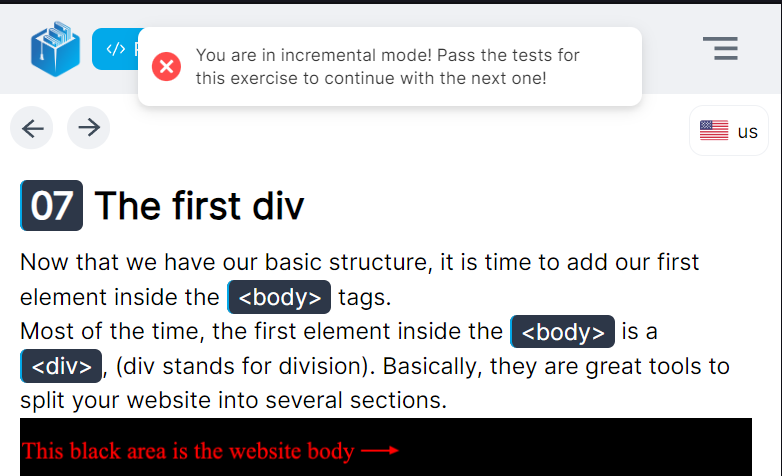
| **Incremental** | You cannot move forward until the current exercise passes its tests. Later steps depend on earlier knowledge. | Linear tutorials where each concept builds on the previous one. |
| **Isolated** | Each exercise is independent, open any step in any order. | Drill practice, reference packs, non-linear paths. |
| **No grading** | Exercises have no tests. | Reading tasks, demos, exploratory content. |
 Tip: Start with Incremental for structured courses, and use Isolated for optional practice modules.
## Test frameworks
| Language or content | Recommended framework |
| --------------------------------- | --------------------- |
| HTML, CSS, React, JavaScript, DOM | **Jest** |
| Python | **pytest** |
Keep assertions clear and deterministic so feedback stays fast and readable.
## Validate your unit tests
Use the CLI to audit each exercise’s tests. Ensure each exercise includes a hidden solution file so the command can assert against it.
```bash theme={null}
learnpack test
```
**How it works:** when a `solution.hide` file exists in an exercise, `learnpack test` runs the test suite against that solution to confirm your checks are correct and aligned with the expected outcome.
Outcome: reliable auto-grading, consistent feedback, and fewer false negatives during learner submissions.
## Next up
Tip: Start with Incremental for structured courses, and use Isolated for optional practice modules.
## Test frameworks
| Language or content | Recommended framework |
| --------------------------------- | --------------------- |
| HTML, CSS, React, JavaScript, DOM | **Jest** |
| Python | **pytest** |
Keep assertions clear and deterministic so feedback stays fast and readable.
## Validate your unit tests
Use the CLI to audit each exercise’s tests. Ensure each exercise includes a hidden solution file so the command can assert against it.
```bash theme={null}
learnpack test
```
**How it works:** when a `solution.hide` file exists in an exercise, `learnpack test` runs the test suite against that solution to confirm your checks are correct and aligned with the expected outcome.
Outcome: reliable auto-grading, consistent feedback, and fewer false negatives during learner submissions.
## Next up
Build checks for understanding directly in your course.
Structure content for clarity and progress.
Context-aware tutoring that supports graded flows.
Share a link, export SCORM, or embed in your LMS.
## See also
* [Adding diagrams to your LearnPack course](/creating-courses/adding-diagrams-to-your-learnpack-course)
* [Adding images to your courses and packages](/creating-courses/adding-images-to-your-courses-and-packages)
* [Exporting to SCORM and embedding in LMS](/publishing-and-exports/exporting-to-scorm-and-embedding-in-lms)